Bluehost AI Builder Review: We Built a Bakery Website From One Sentence
By Thomas Lovas Lokoy — researched and drafted with AI assistance from published sources; edited and published by NorwegianSpark SA · Editorial policy
Paid partnership with Bluehost. Bluehost pays us a flat fee for this article, and a commission if you sign up through our links. We built the site ourselves and wrote what we saw; the screenshots are from our own build. #sponsoredbybluehost
Bluehost AI Builder is Bluehost's new way to make a website: you describe the business in plain language, the builder writes and designs the pages, and you change anything by chatting with it. Bluehost marks it Early Access on its own page. It is $0 to start, no credit card, and Bluehost lists paid plans from $20/mo.
We wanted to know what one sentence actually gets you, so we built a site for a small bakery and kept every screen. This review covers what we typed, what came back, one edit by chat, what the free plan includes, and what you still have to do yourself before a real business goes live.
What Bluehost AI Builder is
Bluehost sells it as an all-in-one builder for small businesses. On its product page the steps are Describe, Style, Watch it build, Refine, Publish, Run and grow, and four promises are worth noting before you start:
- Free to start, no card. You can build on the free plan.
- Minutes to a first version. You describe it; the builder does the first draft.
- 24/7 human support on every plan, including Free, according to Bluehost.
- Hosting never uses your building credits. Building and editing use credits; keeping the site online does not.
You can also connect a domain you already own, but that needs a paid plan.
Step 1: Describe the business in one sentence
The starting screen is a single box headed "Describe it in your own words", with an option to add your logo, photos or "a site you like" (PNG, JPG or WebP, up to 5 MB each). There are ready-made prompts for a business site, portfolio, landing page, booking site, customer portal and quote requests, but we wrote our own:
"A website for a small independent bakery: a home page with our story, a daily bread and pastry menu with prices, opening hours and location, and a form to pre-order a celebration cake."
When we pressed Build for free, Bluehost asked us to create an account first (Google, Apple, GitHub or email). That is the one step you cannot skip: you can type the prompt without an account, but you need one to see the result.
Step 2: What came back
A few minutes later the builder reported: "Your Small Batch Bakery site is ready, in a warm rhubarb and cocoa look." It had made four pages: a home page with the bakery's story, a menu, a Visit page with hours and a map, and a celebration-cake pre-order form.
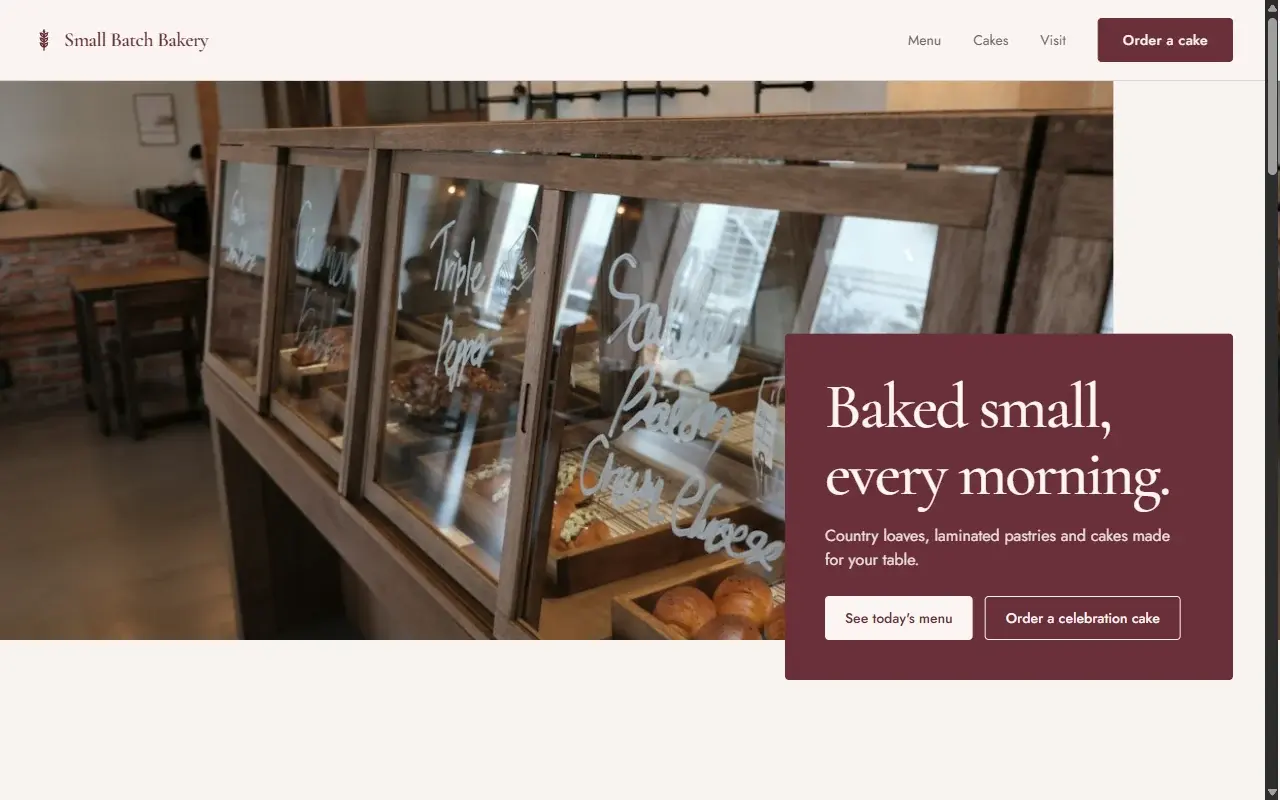
Two things stood out. First, the design is not a template with our words dropped in: the colours, the serif headings and the layout all matched the "small batch" idea. Second, the builder was honest about what it did not know. Its own message said: "The bakery name, address, phone, hours and the 10 menu items are samples. Update them in your dashboard." A real bakery would replace all of those before publishing, and Bluehost says so up front.
The menu page lists breads, pastries, cakes and tarts, and drinks, each with a short description and a price. The footer carries the sample address and opening hours, clearly marked as samples.
Step 3: Change it by chatting
Building the first version is the easy part of any builder. The real test is whether you can change things without learning an editor. We typed one request into the chat box:
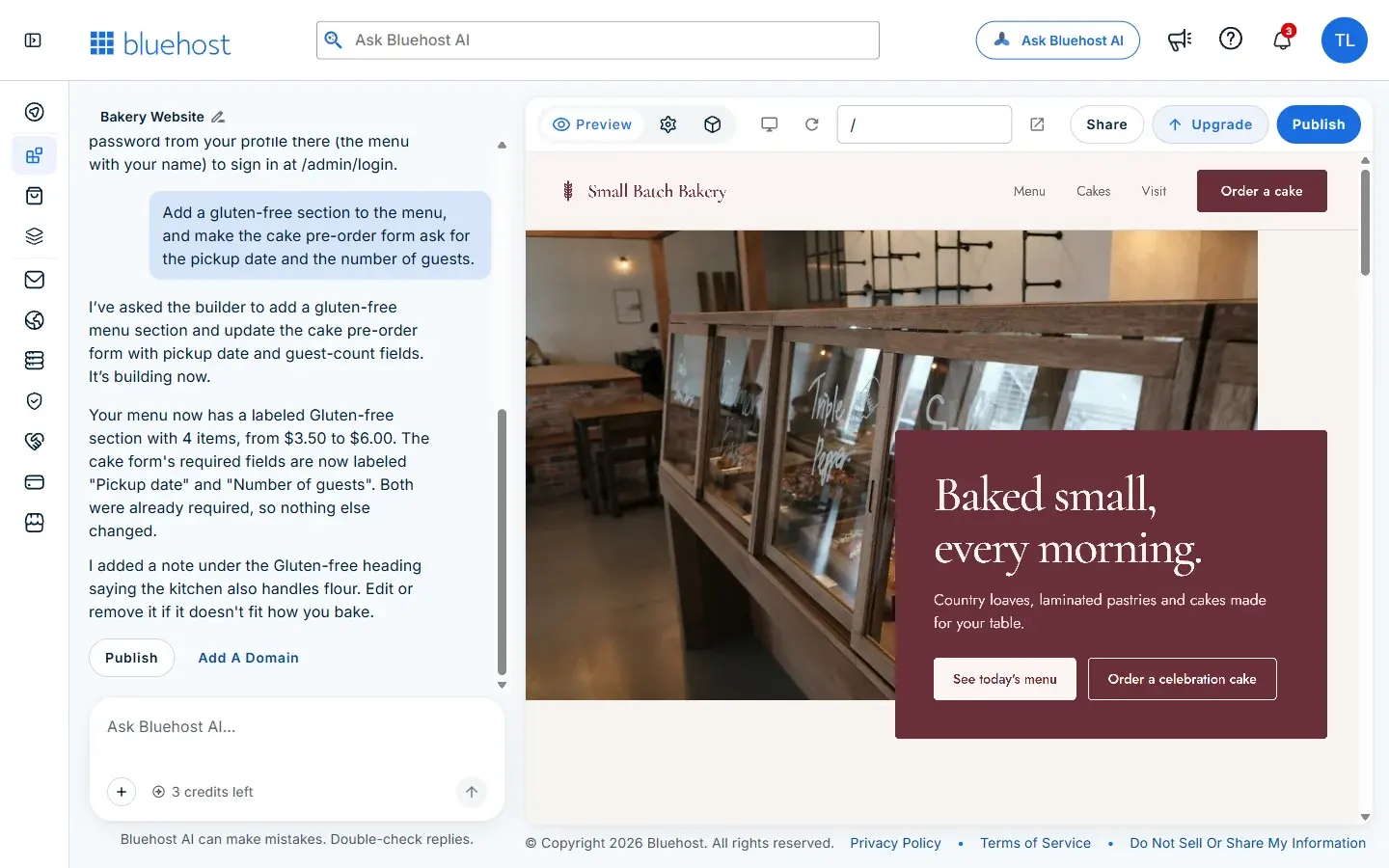
"Add a gluten-free section to the menu, and make the cake pre-order form ask for the pickup date and the number of guests."
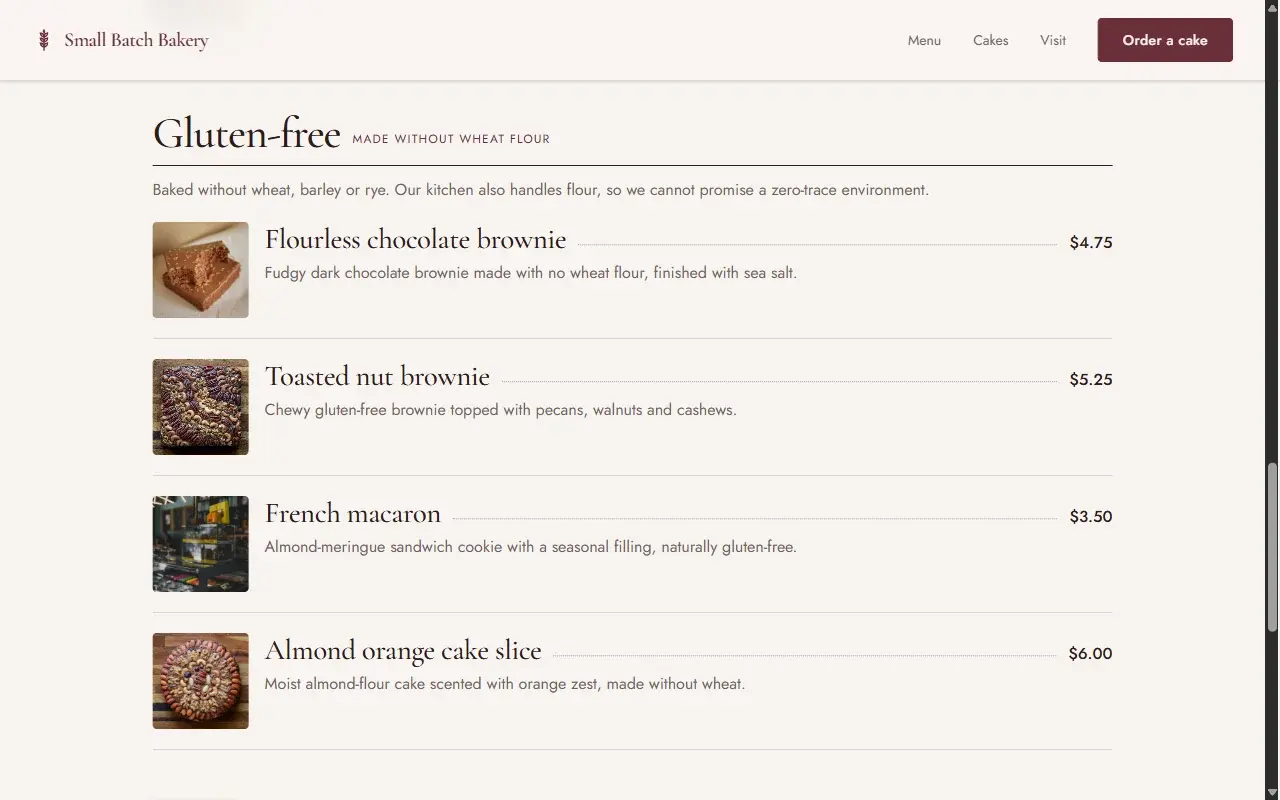
The builder answered that it was building the change, then summarised what it had done: "Your menu now has a labeled Gluten-free section with 4 items, from $3.50 to $6.00. The cake form's required fields are now labeled 'Pickup date' and 'Number of guests'." It also added a note we had not asked for, and explained why: the kitchen also handles flour, so the section says the bakery cannot promise a zero-trace environment. That is exactly the kind of caveat a real bakery should show, and the builder told us we could edit or remove it.
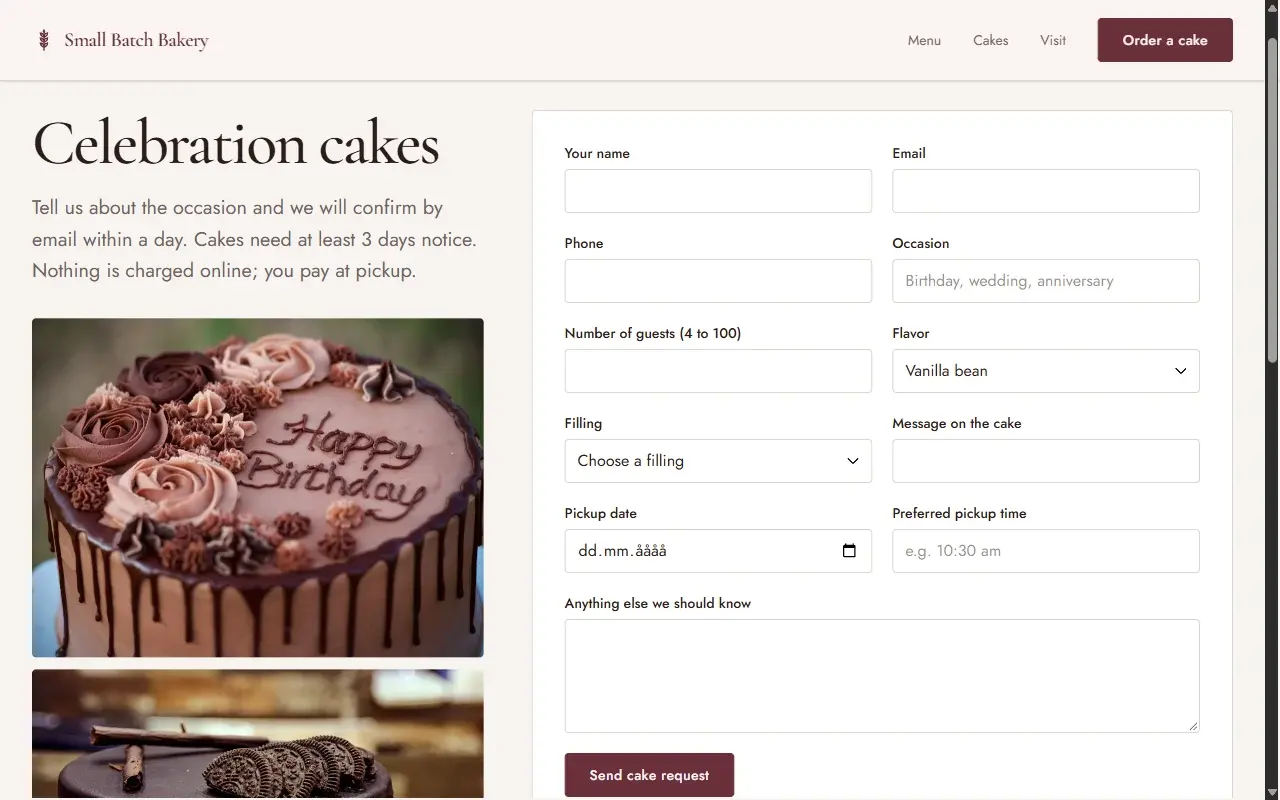
The form also says that nothing is charged online and the customer pays at pickup, which fits a small bakery that does not want to take card payments on the site.
Credits: what the free plan really covers
Building and editing use credits. After our first build the free plan showed 4 credits left; after the single chat edit it showed 3. So on the free plan you can build a first version and make a handful of edits before you need to think about a paid plan. Bluehost's point that hosting never uses credits matters here: once the site is published, keeping it online does not eat into what you have left for edits.
Mobile
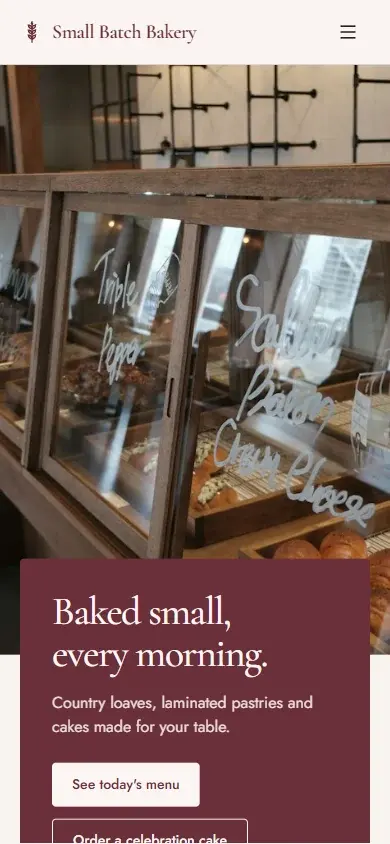
We checked the home page at phone width. The layout reflows properly: the menu collapses into a button, the photo stays on top and the heading and buttons stack below it.
Publishing and your own domain
To go live you press Publish. The builder explains the next step in plain words: open your dashboard from the Manage button beside the preview, and once published, set a password from your profile so you can sign in at the site's /admin/login page. Your site can go live on the free plan; connecting your own domain needs a paid plan.
If you do not have a domain yet, that is a separate decision. Our guide to the best domain registrar for a small business covers what a domain really costs after the first year, and our website builders comparison shows how the traditional builders handle the same job.
What we liked
- One sentence really is enough for a first version. Four sensible pages, real sample content and a design that fits the business.
- Edits by chat work, and each one comes with a summary of what changed.
- It flags its own guesses. Sample data is labelled as sample data, and it added a sensible allergy caveat.
- $0 to start, no credit card, and the live site does not use credits.
What to watch for
- You need an account before you see anything. Typing the prompt is free and anonymous; building is not.
- Credits run out. Our free plan went from 4 to 3 with one edit. Plan your edits.
- Every sample has to be replaced. Name, address, phone, hours and prices are placeholders until you change them.
- Your own domain needs a paid plan. Bluehost lists paid plans from $20/mo.
- It is Early Access. Bluehost labels it that way, so expect changes.
Who it suits
Bluehost AI Builder suits a small business owner who wants a clean, working site this week and would rather describe changes than learn an editor: a bakery, a florist, a studio, a local service that takes quote requests. If you want to hand-code every detail, or you need a large shop with hundreds of products, a traditional builder or WordPress will give you more control. If you are weighing Bluehost's regular hosting instead, our Bluehost vs Hostinger comparison covers the renewal prices.
Verdict
From one sentence, Bluehost AI Builder gave us a four-page bakery website that looked designed rather than assembled, and a chat edit that did exactly what we asked. Before a real launch you would replace every sample detail, and you will want a paid plan for your own domain, but as a way to get a small business online quickly it does what Bluehost says it does.
Try Bluehost AI Builder: $0 to start, no credit card
Built and tested by us on 14 November 2026; Bluehost's product page re-checked on 19 November 2026. Plans, prices and features can change, so check Bluehost's own pages before you buy.
Last updated: