How to Build a Small-Business Website With Bluehost AI Builder: One Sentence, Then Refine by Chat
By Thomas Lovas Lokoy — researched and drafted with AI assistance from published sources; edited and published by NorwegianSpark SA · Editorial policy
Paid partnership with Bluehost. Bluehost pays us a flat fee for this guide, and a commission if you sign up through our links. Every step below comes from our own build; the screenshots are ours. #sponsoredbybluehost
Bluehost AI Builder makes a website from a description: you write what your business needs in plain language, it builds the pages, and you change things by chatting with it. It is $0 to start, no credit card, Bluehost lists paid plans from $20/mo, and Bluehost marks the product Early Access.
In our hands-on review we built a bakery site. For this guide we built a second, different business from scratch, a home cleaning service that takes quote requests, and wrote down every step: the one sentence we typed, what came back, the edits we asked for by chat, and what you still have to check before a real customer sees the site.
Step 1: Write one sentence that answers four questions
The builder starts with a single box headed "Describe it in your own words". A good first sentence answers four questions:
- What kind of business? It sets the tone, the colours and the wording.
- Which pages? Name the pages you want, not a vague "a nice website".
- What has to be on them? Prices, the areas you cover, reviews, opening hours.
- What should a visitor be able to do? The action that earns you money: book, order, or ask for a quote.
This was our whole prompt for the cleaning service:
"A website for a small home cleaning service: a home page that explains what we clean and which neighbourhoods we cover, a page with our three cleaning packages and prices, a few customer reviews, and a form where people can request a free quote with their address, home size and preferred date."
Bluehost also offers ready-made starting prompts for a business site, portfolio, landing page, booking site, customer portal and quote requests, so you can start from one of those and change the details.
A template you can copy
"A website for [type of business]: [page 1 and what is on it], [page 2 and what is on it], [reviews or a gallery], and a [form or booking] so customers can [the action you want]."
A few examples in the same shape:
- "A website for a mobile dog groomer: services with prices, the areas we cover, reviews, and a booking request form with the dog's size and preferred date."
- "A portfolio for a wedding photographer: galleries by wedding, packages, and an enquiry form with the wedding date and venue."
- "A website for a small physiotherapy clinic: treatments with prices, the team, opening hours and location, and an appointment request form."
Step 2: Create an account and let it build
When you press Build for free, Bluehost asks you to sign in or create an account before it builds. The builder first says it is reading your prompt, then works through your pages. Ours took a few minutes. While it worked, Bluehost offered four optional questions about who we are ("Business owner", "Freelancer or agency" and so on) to tailor its tips; the build carries on whether you answer them or not.
When it finished, the builder told us exactly what it had made and what was not real yet:
"Your Fresh Home Cleaning site is ready, in a fresh teal look. It has the home page, packages, reviews and a free quote form. The name, prices, neighborhoods, reviews, phone and hours are samples to replace in your dashboard. Quote emails send once you connect email."
That last sentence matters for a business that lives on quote requests: the form is there straight away, but you have to connect email before the requests reach you.
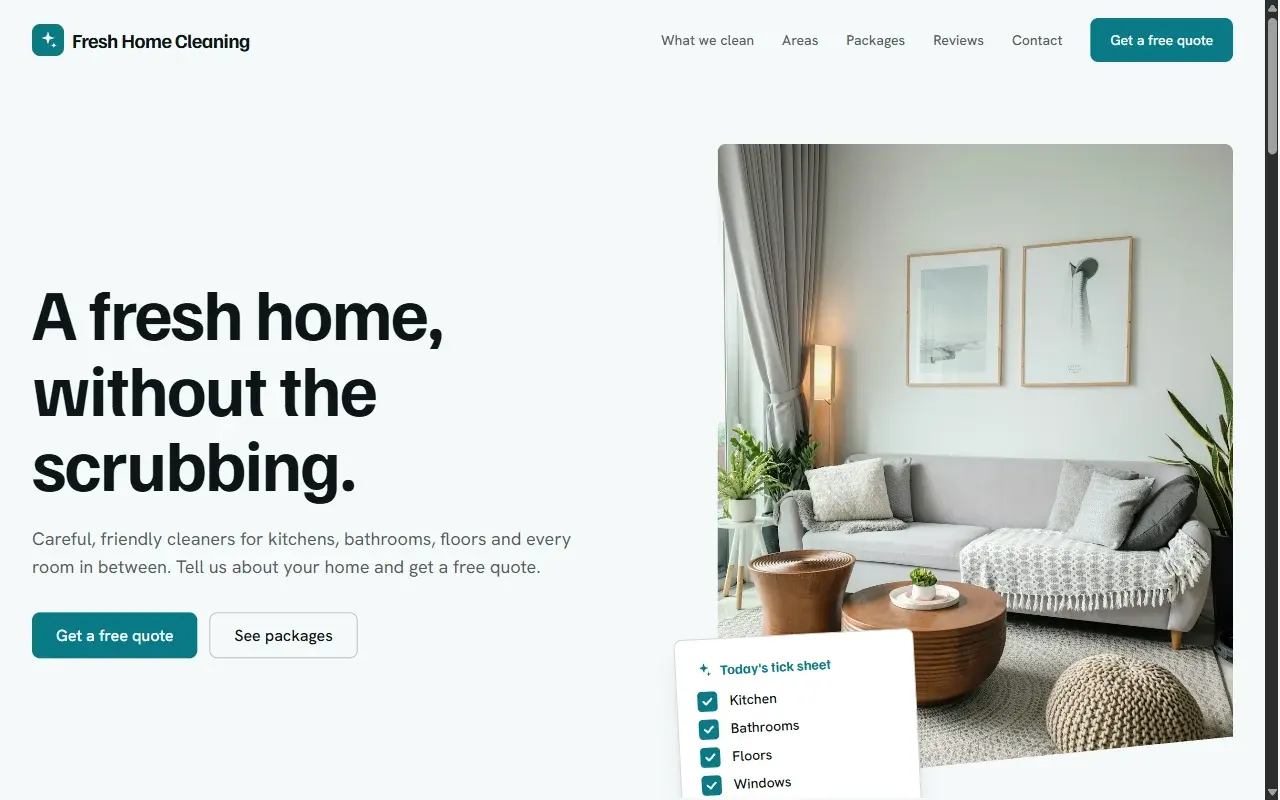
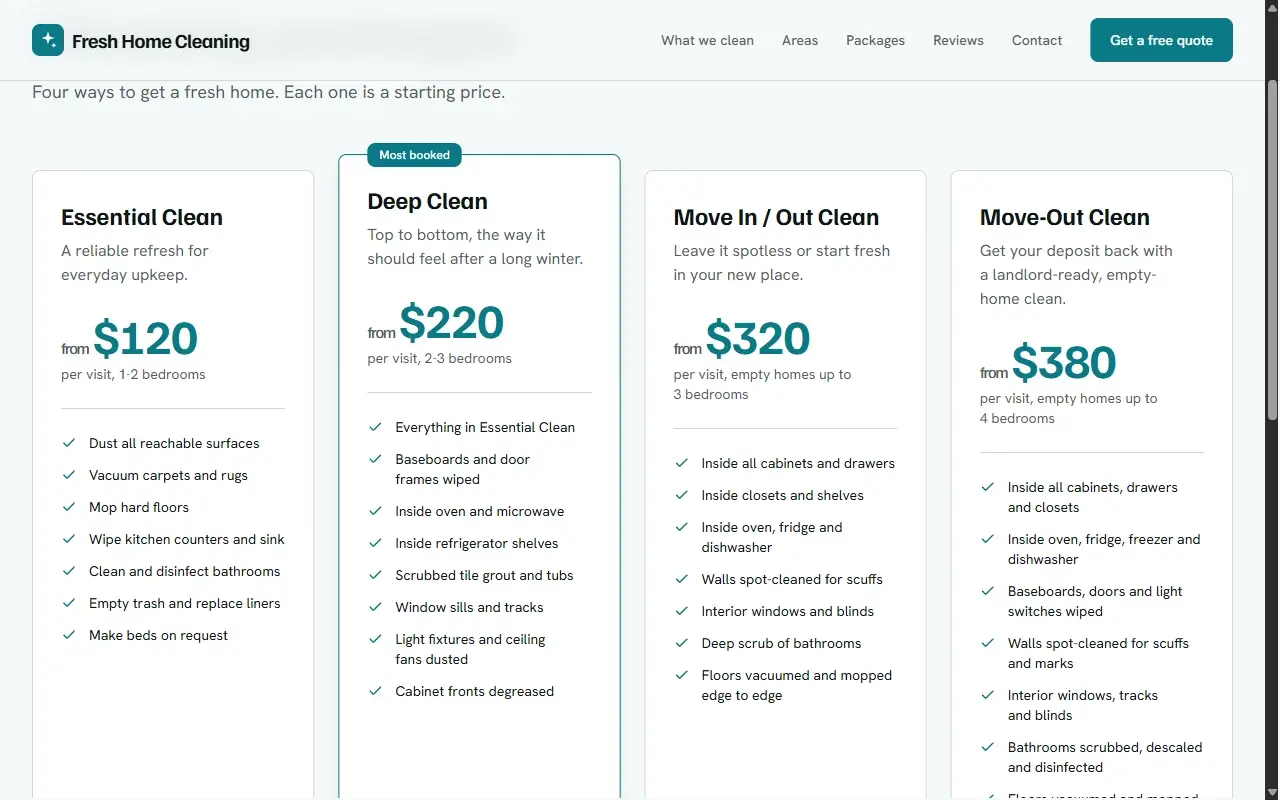
The site came with six sections in its menu: What we clean, Areas, Packages, Reviews, Contact and Get a free quote. The packages page listed three packages as starting prices: Essential Clean from $120 for one to two bedrooms, Deep Clean from $220 for two to three bedrooms (marked "Most booked"), and Move In / Out Clean from $320 for empty homes. All of those prices are samples; a real cleaning company would put in its own.
Step 3: Refine it by chat, one outcome per message
The first build is about structure. Changing it is where a chat-based builder either earns its place or does not. We asked for two things in one message:
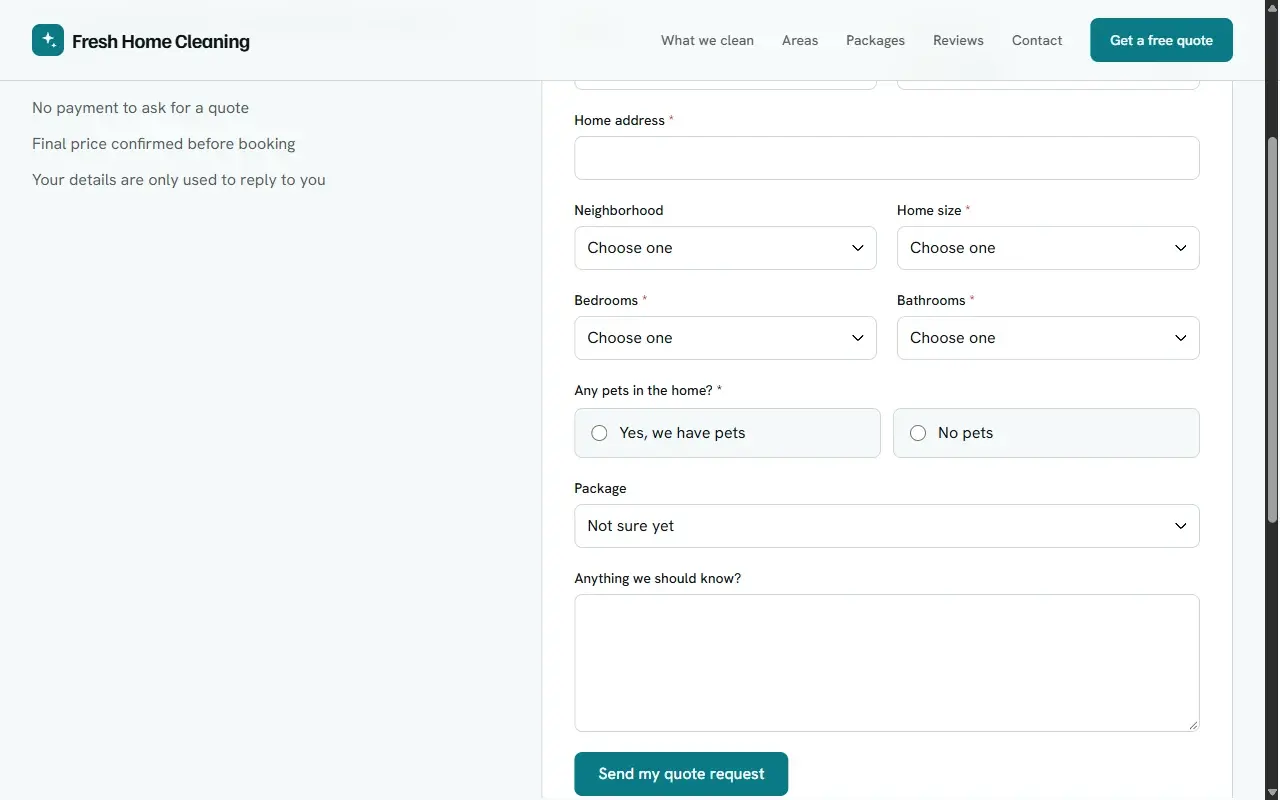
"Add a move-out clean as a fourth package, and make the quote form also ask for the number of bedrooms and bathrooms and whether there are pets in the home."
The builder made both changes and summarised them: "Your fourth package, Move-Out Clean, is now on the home page and packages page at $380. The quote form now asks for bedrooms, bathrooms and pets, and the three fields stack on phones."
Then it did something we found genuinely useful. It noticed a problem with our own request: "Your existing 'Move In / Out Clean' package is still there, so the two overlap. Do you want me to rename it 'Move-In Clean'?" A human web designer would have asked the same question.
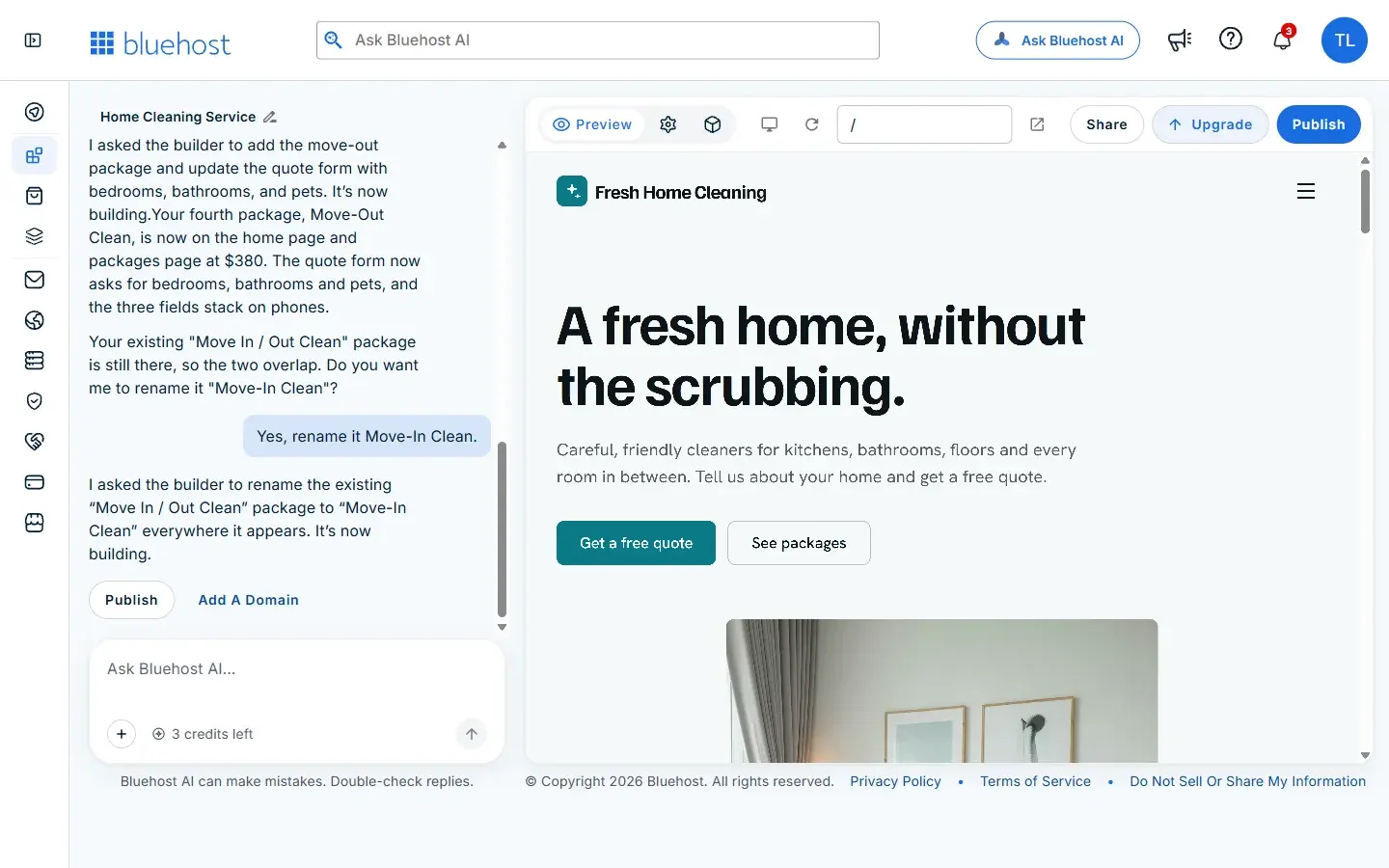
We answered "Yes, rename it Move-In Clean." The builder replied that it had asked for the rename and that it was building, but in our session the change had not appeared on the packages page after about ten minutes, and the credit counter had not moved. So the honest advice is: after each request, open the page and check that the change is really there before you move on.
Tips for editing by chat
- Ask for outcomes, not code. "Make the form ask for bedrooms" works; you never touch a field editor.
- Read the summary. It tells you what changed, and sometimes what the builder noticed on its own.
- Answer its questions. Our overlap question would have been easy to miss and would have confused customers.
- Check the page after every edit. A reply that says "building" is not the same as a finished change.
How credits work
Building and editing use credits. Our free plan showed 5 credits when we started this build, 4 after the first version and 3 after the first edit. Bluehost states that hosting never uses your building credits, so a published site stays online whatever your credit balance. Plan your edits: group related changes into one clear message rather than many small ones.
Website, app, or both?
Bluehost AI Builder is not only for websites. Bluehost's page puts it this way: "Your website gets you found. Your app runs the work. Start with either one. Add the other by asking in the same conversation."
For a business that lives on quote requests, that is the next step after this guide. The website gets you found and collects requests; an app could keep a list of those requests with a status for each, so nothing falls through the cracks. Start with whichever problem costs you more time today, and ask for the other later in the same chat.
Before you publish: a short checklist
- Replace every sample: business name, prices, areas, reviews, phone and hours. Never publish sample reviews as if they were real.
- Connect email so quote requests actually reach you, then send yourself a test request.
- Read every page on a phone as well as a computer.
- Decide on a domain. You can publish on the free plan, but your own domain needs a paid plan; Bluehost lists paid plans from $20/mo. Our guide to the best domain registrar for a small business explains what a domain costs after the first year.
- After publishing, set a password from your profile so you can sign in at your site's /admin/login page, as the builder explains.
Is Bluehost AI Builder right for your business?
It suits a small business owner who wants a clean, working site this week and would rather describe changes than learn an editor: a cleaner, a groomer, a florist, a local service that takes quote requests. Bluehost's own comparison table sets it against Lovable, Bolt and Hostinger on points such as a free plan without a card, hosting that does not use credits and 24/7 human support on every plan; those are Bluehost's claims, and the right choice still depends on how much control you want. If you want to compare it with traditional builders, see our website builders comparison.
The first version costs nothing to see, so the quickest way to judge it is to write your own sentence.
Build your site with Bluehost AI Builder: $0 to start, no credit card
Built and written by us on 19 November 2026 from our own build and Bluehost's product page. Plans, prices and features can change, so check Bluehost's own pages before you buy.
Last updated: